

10 Best Options for Scalable Compute Resources in Cloud Environments

Table of Contents

With workloads growing more complex and demand becoming less predictable, selecting the right scalable compute resource is critical for modern organizations. From AI model training and batch analytics to global e-commerce and regulated environments, cloud computing resources must balance elasticity, cost, performance, and control.
Below is a quick comparison of the 10 best options for scalable compute resources in cloud environments, including public, private, hybrid infrastructure, and specialized AI platforms:
| Provider | Ideal For |
| PSSC Labs | High-performance AI, HPC, compliance-heavy, cost-controlled environments |
| AWS EC2 Auto Scaling | Cloud AI training, analytics, dynamic web workloads |
| Azure VM Scale Sets | Stateless APIs, microservices, regional load balancing |
| Google Cloud MIGs | Batch processing, analytics, resilient multi-zone services |
| Oracle OCI Autoscaling | Oracle databases, mixed OLTP/OLAP, enterprise analytics |
| IBM Cloud Bare Metal | Regulated workloads, financial modeling, life sciences |
| DigitalOcean + DOKS | Startups, SaaS, developer-friendly scaling |
| Alibaba Cloud ECS + Auto Scaling | APAC-centric workloads, regional compliance |
| Paperspace + Gradient | AI/ML experimentation and model iteration |
| Scaleway Elastic Metal + Instances | GDPR-compliant hybrid deployments |
Whether you’re running containerized apps, AI pipelines, or legacy enterprise workloads, this guide will help you match your compute architecture to your operational and business needs.
1. PSSC Labs High-Performance Compute
PSSC Labs provides purpose-built, on-premises and hybrid cloud infrastructure tailored for high-performance computing (HPC), AI/ML, and scientific workloads. Our systems are custom-configured to support intensive AI, data analytics, and simulation tasks, offering direct access to high-bandwidth memory and cutting-edge GPUs such as the H100, H200, and GH200. With full control over cost, data locality, security, and compliance, PSSC Labs delivers infrastructure that meets the rigorous demands of regulated and performance-sensitive environments.

Cloud Resources Built for Performance-Intensive Applications
PSSC Labs is ideal for organizations needing consistent performance, data sovereignty, or regulatory assurance.
- Engineered for low-latency, high-throughput workloads
- Tailored systems for applications like GenAI, molecular modeling, and financial analytics
- Seamlessly integrates with hybrid environments to support cloud development resources
Managing Cloud Resources With Precision
Enables granular control over cloud-based resources and infrastructure. Teams can:
- Build and scale clusters with custom CPU, GPU, and storage profiles
- Implement hardened security models for compliance-heavy environments
- Use orchestration and monitoring tools to fine-tune resource allocation
Cloud Cost Management and Control
Helps organizations manage infrastructure spend with:
- Transparent, fixed-cost pricing models that eliminate surprise bills
- TCO advantages over public cloud for long-running, high-throughput jobs
- Flexible procurement options that align with budget cycles and funding models
Use Case: AI and Scientific Workloads With Data Control
A biotech company runs large-scale genomic simulations and ML pipelines on PSSC Labs hardware:
- Dedicated compute nodes ensure consistent throughput for training and simulation
- Sensitive datasets stay on-premises to meet regulatory and IP protection requirements
- Systems integrate with cloud storage and object services for offsite collaboration and backup
Uncover the latest trends in AI cloud computing and how to leverage the power of AI.Ebook: Navigating AI Cloud Computing Trends

2. AWS EC2 Auto Scaling Groups
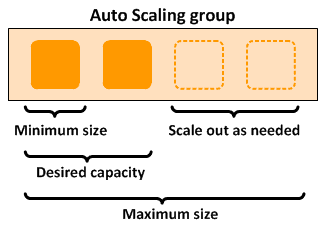
AWS EC2 Auto Scaling Groups offer highly flexible, scalable compute by automatically adjusting instance counts based on demand. Ideal for cloud AI, analytics, and event-driven workloads, ASGs help organizations optimize performance and cost by scaling only when needed.
Public Cloud Resources That Scale Automatically
AWS Auto Scaling Groups exemplify how public cloud resources adapt to demand. Instead of overprovisioning, users define scaling policies triggered by:
- CPU or network usage
- Custom CloudWatch metrics
- Scheduled events
This elasticity ensures efficient use of cloud computing resources during traffic spikes or slowdowns.
Managing Cloud Resources with CloudWatch + Auto Scaling
AWS CloudWatch enables automated management of cloud resources by tracking key metrics and triggering scaling actions. This helps teams:
- Automate performance-based scaling
- Reduce manual intervention
- Meet SLAs efficiently
- Optimize cloud operations platform resources
Example: Autoscaling for GenAI Model Training Pipelines
Consider a GenAI model training pipeline that uses distributed training across multiple EC2 instances. Workload intensity can vary dramatically depending on the model architecture, dataset size, and training phase. Using EC2 Auto Scaling, the training environment can automatically spin up additional GPU-backed instances during intensive compute phases and scale down during evaluation or idle periods. This not only enhances performance but also aligns with cloud cost management resources best practices—reducing costs while maintaining SLA adherence.
3. Azure Virtual Machine Scale Sets (VMSS)
Azure Virtual Machine Scale Sets (VMSS) provide horizontal scaling for stateless applications by managing a fleet of VMs as a single, elastic resource group—ideal for cloud-native workloads needing distributed load handling.
VMSS is designed to support:
- Web frontends and RESTful APIs
- Event-driven microservices architectures
- Containerized workloads (via AKS or custom images)
- Machine learning inference endpoints
It’s a go-to choice for businesses looking to deploy cloud-based resources that can scale in and out quickly, while maintaining high availability and cost efficiency.

How Azure Manages Cloud Computing Resources
Azure VMSS centralizes management by treating virtual machines as a scalable pool, not individual instances. It supports:
- Uniform or flexible orchestration
- Built-in load balancing
- Rolling updates and fault-zone awareness
This reflects the pooled resources in cloud computing model—shared capacity that scales horizontally with minimal complexity.
Integration With Azure Monitor, Load Balancer, and Autoscale
Azure VMSS integrates tightly with:
- Azure Monitor for resource visibility
- Load Balancer for traffic distribution
- Autoscale for rule-based instance adjustments
These tools help organizations optimize cloud resources while maintaining availability and reducing ops overhead.
Use Case: Scalable API Backend Deployment
A common use case for Azure VMSS is building a scalable API backend that can handle variable request volume across multiple geographies. For example:
- A global e-commerce company deploys stateless API services across several Azure regions
- VMSS dynamically adjusts the number of VMs per region based on hourly traffic and real-time load
- Azure Monitor feeds metrics into Autoscale rules to scale out during high-demand flash sales and scale in during off-peak hours
- Load Balancer routes requests to healthy nodes, ensuring minimal downtime and latency
4. Google Cloud Compute Engine with Managed Instance Groups
Google Cloud Compute Engine with Managed Instance Groups (MIGs) simplifies deployment of scalable, self-healing cloud resources. By using VM templates, MIGs automate provisioning and scaling across zones—an effective example of pooled cloud computing resources.
With MIGs, resources are:
- Automatically distributed across availability zones for fault tolerance
- Load-balanced via HTTP(S) Load Balancer or Network Load Balancer
- Automatically recreated in case of instance failure
- Managed as a cohesive unit for simplified orchestration
This approach helps ensure reliable cloud compute resources that can handle spikes, failures, and batch-intensive tasks without downtime.

How GCP Manages Combined Cloud Resources
GCP’s Managed Instance Groups (MIGs) simplify infrastructure by managing VMs as a unified group. Teams define:
- Instance templates
- Target group size
- Autoscaling and health checks
- Zonal or regional placement policies
This approach reflects how cloud computing service providers use combined resources in cloud computing to reduce complexity and improve scalability.
Experience Cloud Resources With Live Migration and Preemptible VMs
GCP enhances cloud resource experience through:
- Live migration for seamless host updates
- Preemptible VMs for low-cost, short-lived workloads
- Custom machine types to right-size compute needs
These features help organizations balance uptime, flexibility, and cost when scaling cloud operations.
Use Case: Batch Processing for Real-Time Analytics
One of the strongest use cases for GCP MIGs is large-scale batch processing in support of real-time analytics. For example:
- A media company needs to transcode thousands of video files per hour during peak times
- Preemptible VMs are used to handle parallel processing tasks at a fraction of the cost of regular instances
- Managed Instance Groups scale up quickly to match incoming workloads and downscale after jobs complete
- Live migration ensures that critical monitoring services stay available even during scheduled maintenance
5. Oracle Cloud Infrastructure (OCI) Compute Autoscaling
Oracle Cloud Infrastructure (OCI) Compute Autoscaling supports high-performance enterprise workloads with flexible scaling and cost-efficient pricing—making it a strong fit for core systems like Oracle databases and data-heavy applications.
Key advantages of OCI Autoscaling include:
- Per-second billing with burstable instances
- Auto-scaling policies based on CPU, memory, or custom application metrics
- Seamless integration with Oracle RAC, Exadata, and MySQL HeatWave
- Enterprise-grade security and compliance certifications
For organizations already invested in Oracle technologies, this setup provides some of the best scalable compute resources for cloud AI, analytics, and core transactional systems.

Cloud Resource Examples for Enterprise Databases and Analytics
OCI offers high-performance cloud computing resources tailored for enterprise workloads:
- NVMe and block storage for IOPS-intensive databases
- VM and bare metal compute for OLTP/OLAP
- Autonomous Database with AI-driven tuning
- Data Flow and Big Data Service for Spark pipelines
These purpose-built cloud development resources address both performance and compliance needs.
Cloud Cost Management With OCI Cost Analysis
OCI’s Cost Analysis tools help IT teams optimize cloud resources through:
- Usage tracking by tags or compartments
- Spend forecasting and anomaly alerts
- Budgeting and integration with Cloud Guard for governance
This visibility is key for managing long-running, mission-critical workloads without overspending.
Use Case: Running OLTP/OLAP Apps at Scale
OCI Compute Autoscaling excels in mixed-workload environments that run both transactional and analytical applications. A typical use case might involve:
- A financial institution running OLTP databases during peak trading hours
- The same environment supports OLAP workloads (e.g., daily reporting, fraud detection) in off-peak windows
- OCI Autoscaling provisions extra compute for morning transaction surges and reallocates resources for analytics processing at night
- Cost Analysis monitors usage trends to inform future provisioning and capacity planning
6. IBM Cloud Bare Metal Servers
IBM Cloud Bare Metal Servers deliver single-tenant, high-performance infrastructure without hypervisor overhead—ideal for latency-sensitive or compliance-driven workloads. These external cloud resources also integrate smoothly into hybrid and multicloud environments.
Key features that distinguish IBM Bare Metal include:
- Dedicated hardware access for consistent performance
- Configurable CPUs, memory, storage, and GPUs to match specialized workload needs
- Direct integration with IBM Cloud services, including block storage, backup, and security tools
- Support for secure enclaves and TPM modules for compliance-driven use case.
This makes them ideal for businesses that need reliable cloud compute resources without giving up control or proximity to their data.

When to Use Bare Metal Over Pooled Cloud Resources
While pooled resources in cloud computing are perfect for elasticity and cost savings, there are clear scenarios where bare metal is the better fit. Use bare metal when:
- Performance consistency is non-negotiable
- Hardware-level isolation is required for compliance or security
- Licensing models demand physical hardware (e.g., some Oracle and SAP deployments)
- You’re handling large memory-bound simulations or low-latency analytics
This reinforces the idea that in cloud computing, resources are considered pooled when shared among tenants—but bare metal stands apart by offering total resource exclusivity.
Best for Financial Modeling, Life Sciences, and Simulation
IBM Bare Metal Servers shine in data-heavy, high-stakes workloads such as:
- Financial modeling and Monte Carlo simulations
- Genomic sequencing and other life sciences pipelines
- CAE and CFD simulations in engineering and manufacturing
- AI inferencing or training workloads where latency and throughput matter
These are often tightly coupled with cloud development resources for storage, orchestration, and visualization—demonstrating how hybrid models blend performance with flexibility.
Use Case: Regulatory Workloads Requiring Dedicated Compliance Boundaries
A practical example is in regulated industries like healthcare or finance, where workloads must reside in dedicated environments to meet audit, data sovereignty, or encryption-at-rest requirements.
- A health tech company needs to process patient records under strict HIPAA and GDPR regulations
- IBM Cloud Bare Metal provides isolated compute environments for ETL and ML workloads
- Integration with IBM Cloud Security Services ensures end-to-end encryption and audit trails
- Dedicated hardware helps satisfy legal requirements that rule out pooled cloud infrastructure
7. DigitalOcean Droplet Scaling and Kubernetes Nodes
DigitalOcean offers simple, cost-effective cloud computing resources tailored for developers, startups, and SaaS teams. Its core offerings—Droplets and scalable Kubernetes clusters—enable fast provisioning and support modern containerized applications.
These cloud-based resources prioritize ease of use and fast deployment, making them a go-to choice for teams that want to move fast without a steep learning curve. Key features include:
- 1-click app deployments and pre-configured VM images
- Flat-rate pricing with predictable monthly billing
- Integrated monitoring, backups, and firewalls
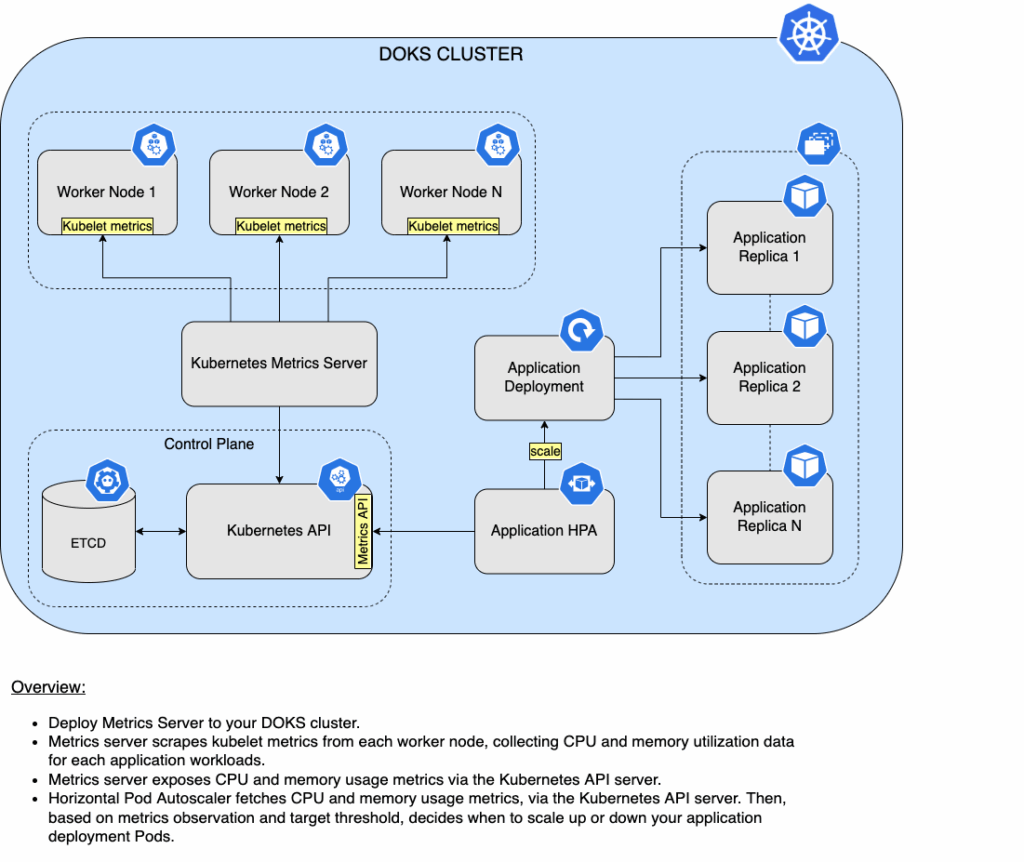
- Support for autoscaling Kubernetes nodes via the DigitalOcean Kubernetes Service (DOKS)
This makes it a compelling option for teams that value developer experience and operational simplicity.
Cloud Resources for Startups and DevOps Teams
DigitalOcean offers developer-friendly cloud resources for fast-growing teams:
- Startups launch MVPs using Droplets and managed DBs
- SaaS products scale via Kubernetes
- DevOps integrates CI/CD, Terraform, and API provisioning
- Simple pricing supports easy cloud cost management
Lean, efficient, and ideal for iterative development.
Managing Resources With Autoscaling Kubernetes
DigitalOcean Kubernetes (DOKS) autoscaling adjusts nodes based on:
- Pod CPU/memory usage
- HPA policies
- Scheduled traffic patterns
Workloads are distributed across pooled cloud resources, optimizing cost and performance. Control via UI or Terraform makes cloud resource management both accessible and automated.
Use Case: Scaling Microservices for Traffic Surges
A great real-world scenario for DigitalOcean is a SaaS startup preparing for a product launch:
- The app backend runs microservices in a Kubernetes cluster with auto-scaling enabled
- Droplets serve as worker nodes that scale up rapidly when the launch traffic spikes
- DOKS automatically adds or removes nodes as needed to meet demand while minimizing idle infrastructure
- Monitoring alerts integrate with Slack to inform the DevOps team of scaling events or bottlenecks
8. Alibaba Cloud ECS + Auto Scaling
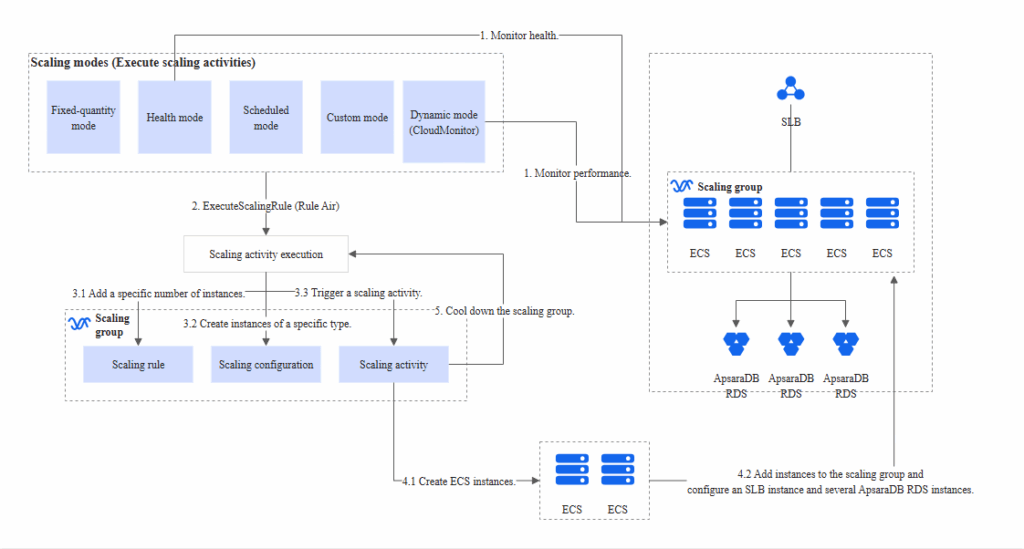
Alibaba Cloud ECS with Auto Scaling offers a scalable, high-availability solution tailored for Asia-Pacific markets. Using pooled cloud resources, ECS efficiently adjusts workloads across regions and time zones.
This architecture is ideal for businesses seeking:
- Elastic, pay-as-you-go compute instances for variable workloads
- Granular resource provisioning with customizable vCPU and memory configurations
- Stateless app scaling using image templates and predefined scaling rules
- Tight integration with Alibaba Cloud’s global network of data centers
It’s a top-tier example of public cloud resources that combine scalability with regional localization, which is critical for APAC expansion.
Public Cloud Resources Tailored for Asia-Pacific Expansion
Alibaba Cloud stands out among cloud computing service providers for its dominant presence in mainland China, Southeast Asia, and emerging global markets. For businesses looking to deploy cloud-based resources in APAC, ECS offers:
- Localized compliance support (e.g., MLPS 2.0, Singapore PDPA, etc.)
- Low-latency regional deployments through global and local zones
- Localized technical support and documentation
- Multilingual user experience and billing dashboards to enhance ease of use
These features help global organizations deploy and manage cloud resources confidently while meeting regional compliance and performance standards.
Management of Cloud Resources With Alibaba Resource Orchestration Service (ROS)
Alibaba’s Resource Orchestration Service (ROS) provides a declarative, Infrastructure-as-Code (IaC) framework that simplifies the management of cloud resources. With ROS, teams can:
- Define infrastructure templates for ECS clusters, Auto Scaling policies, and VPCs
- Automate environment provisioning across development, staging, and production
- Use versioned templates to ensure consistency and reproducibility
- Monitor and roll back failed deployments for better cloud cost management resources
This infrastructure orchestration layer is especially valuable for teams scaling operations rapidly or deploying multi-region architectures with multiple dependencies.
Use Case: E-Commerce Scalability Across Multi-Regions
A typical use case for Alibaba Cloud ECS + Auto Scaling is global e-commerce:
- A retail brand operates storefronts in China, Singapore, and Australia
- ECS instances serve web and app frontends, while Auto Scaling dynamically adjusts resources based on regional traffic patterns
- ROS templates define infrastructure for each region, ensuring standardized deployments
- Auto Scaling policies use metrics like active sessions and I/O throughput to scale up during promotions or holiday seasons
- CDN and SLB (Server Load Balancer) services ensure fast, secure delivery across all geographies
This scenario clearly illustrates how businesses use cloud computing to manage resources across borders while controlling costs and preserving performance. It also underscores how combined resources in cloud computing—like compute, networking, and storage—can be centrally orchestrated for massive operational efficiency.
9. Paperspace + Gradient Compute Clusters
Paperspace’s Gradient platform offers accessible, GPU-backed cloud development resources for AI/ML. Gradient Compute Clusters simplify model training, tuning, and deployment—making them ideal for rapid experimentation and scalable cloud AI workloads.
Why Gradient Compute Clusters stand out:
- Pre-configured Jupyter notebooks with GPU acceleration
- Model versioning, dataset syncing, and containerized environments
- One-click deployment from prototype to cluster
- Seamless transition between development and production environments
This setup supports everything from exploratory data analysis to full-scale model training, offering developers a frictionless way to experience cloud resources in real time.
Best Cloud Compute Resources for Model Iteration at Scale
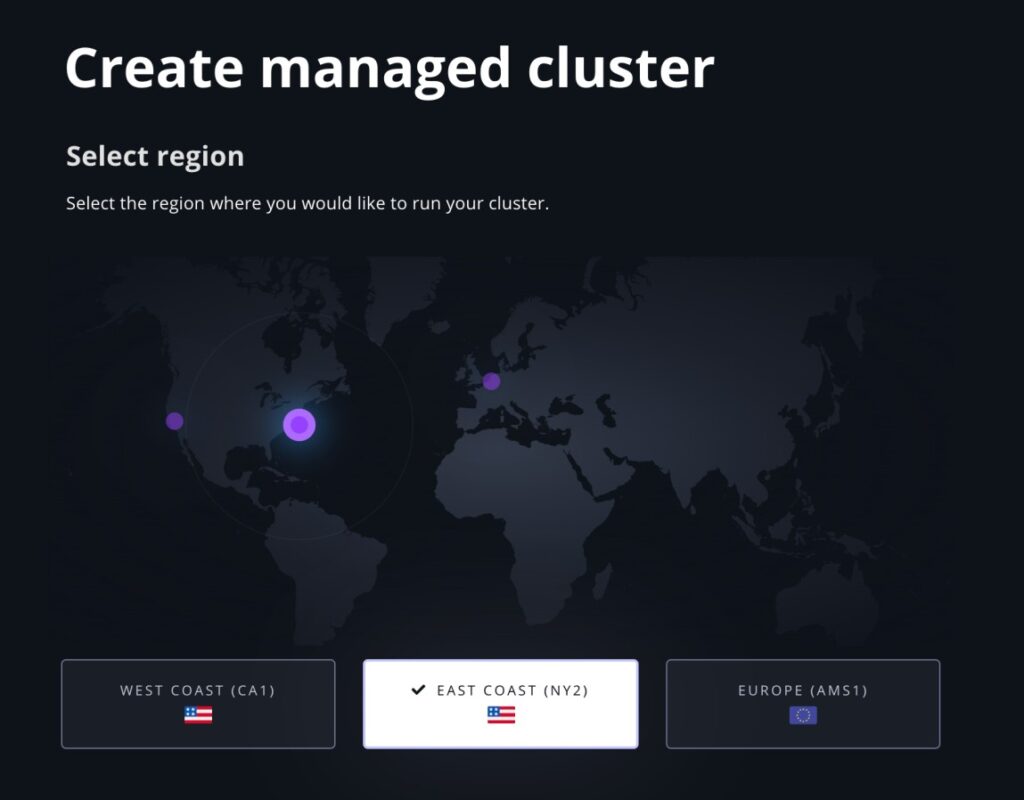
When evaluating cloud computing resources for machine learning, the ability to iterate quickly and scale selectively is key. Gradient delivers this through:
- Auto-scaling GPU clusters that match training job requirements
- Support for multi-node distributed training via PyTorch or TensorFlow
- Job scheduling and spot instance support for cost-effective experimentation
- Integration with GitHub and model registries for reproducible workflows
These features make Gradient ideal for researchers and startups alike—teams that need to optimize cloud resources without the overhead of managing infrastructure directly.
Seamless Transition From Notebook to Production Cluster
One of Gradient’s most impactful features is its notebook-to-cluster flow, designed to support:
- Rapid prototyping in hosted Jupyter environments
- Push-to-cluster deployment of models for production-scale training
- Containerized workloads that run identically across dev, staging, and prod
- Monitoring and logging tools to trace model performance over time
This workflow reduces friction in managing cloud resources across the development lifecycle and makes it easier for teams to collaborate, test, and deploy models reliably.
Use Case: Fast Prototyping of Vision Models With GPU-Backed Jupyter
A great example is a computer vision team prototyping an object detection model:
- They start with a pre-built Jupyter environment using a GPU-enabled Gradient notebook
- After initial experimentation, they launch a distributed training job across a Gradient Compute Cluster using the same code and container
- Model checkpoints are automatically logged, while metrics are visualized via built-in dashboards
- After tuning hyperparameters, the best model is pushed to inference endpoints for deployment testing
10. Scaleway Elastic Metal + Instances
Scaleway’s Elastic Metal and Instances offer a hybrid cloud model that combines bare metal performance with VM flexibility—ideal for privacy-sensitive environments like the EU.
Key attributes of Scaleway’s hybrid model:
- Elastic Metal provides dedicated, single-tenant servers with API-level control
- Cloud Instances offer fast, on-demand provisioning and auto-scaling
- Seamless integration between Elastic Metal and Instances for hybrid architecture
- Native support for IPv6 and private networking to enhance isolation and performance
It’s a smart choice for teams seeking cloud-based resources with performance parity to on-prem setups, but with cloud-native tooling.
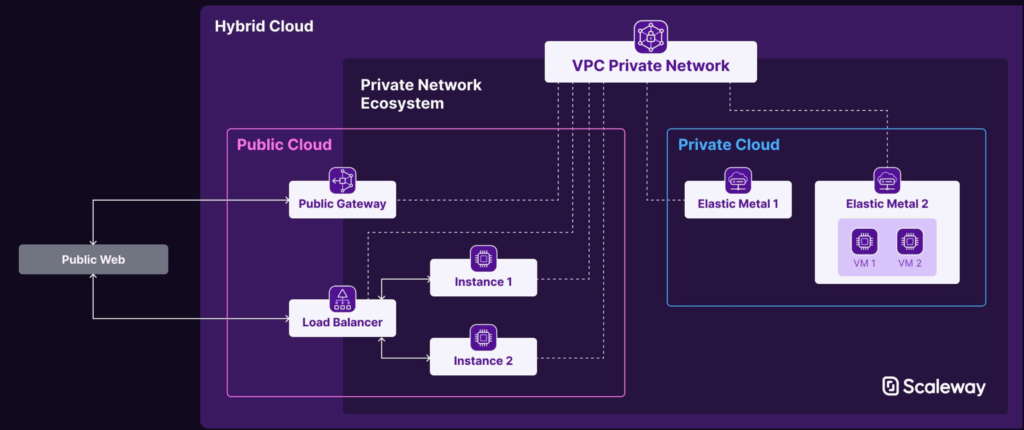
Combined Resources in Cloud Computing: Elasticity + Performance
Scaleway exemplifies how combined resources in cloud computing can be orchestrated to balance elasticity with raw power. By mixing Elastic Metal and Instances within a single platform, businesses can:
- Run latency-sensitive inference workloads on dedicated hardware
- Handle bursty traffic or batch jobs using cloud Instances
- Maintain unified management through a single dashboard and API
- Leverage pooled storage and networking resources across both compute types
This approach showcases why in cloud computing, resources are considered pooled—even when mixing virtualized and bare metal environments. The key is orchestration, not homogeneity.
Optimize Cloud Resources With Multi-Cloud-Friendly Pricing
Scaleway offers competitive, transparent pricing that supports cloud cost management resources without vendor lock-in. Cost optimization features include:
- Predictable hourly/monthly rates for both Elastic Metal and Instances
- Zero-cost egress options for certain outbound traffic classes
- Reserved capacity discounts for longer-term deployments
- Flexibility to move workloads between regions or zones with minimal overhead
This makes it easier for organizations to optimize cloud resources across multiple providers—especially when operating in hybrid or multi-cloud configurations.
Use Case: GDPR-Compliant Compute for AI Inference Pipelines
A standout use case involves deploying AI inference pipelines that must comply with strict data protection regulations, such as the GDPR:
- A European healthcare AI company processes sensitive patient imaging data
- Elastic Metal servers are used for inference workloads requiring dedicated hardware within compliant data centers
- Cloud Instances handle non-sensitive tasks like preprocessing and job scheduling
- Networking rules and encrypted storage policies ensure end-to-end security
- Scaleway’s France- and Netherlands-based zones provide regulatory assurance for local data residency
Final Thoughts on Scalable Compute Resources in Cloud

The compute landscape is no longer one-size-fits-all. The best options for scalable compute resources in cloud environments need to be flexible, easily integratable with various tools, and cost-effective.
For teams with demanding performance, cost predictability, or compliance requirements, PSSC Labs offers a unique advantage: custom-configured compute systems designed for AI, HPC, and secure data workloads—without the hidden costs or limitations of public cloud. With fixed pricing, full control, and cutting-edge GPU support, it’s a future-proof solution for hybrid and on-prem environments.
Contact us today to learn how our systems can deliver scalable, high-performance compute—tailored to your unique workload.